
Step-by-Step:
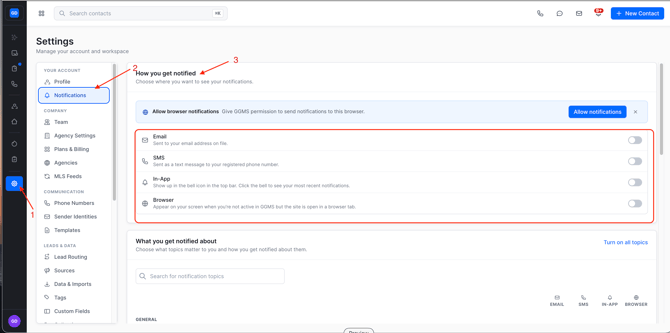
- Go to Settings
- From inside the platform, click Settings.
- Under Settings, select Notifications.
- Look under How you get notified
- Toggle on how you would like to be notified
- The CRM gives you 4 notification options
- SMS
- In-App
- We recommend this always being on
- Browser
- This will notify you via the browser if you are not on the CRM tab
- When you toggle these on at the top, it will automatically apply these to all notifications.
- The CRM gives you 4 notification options
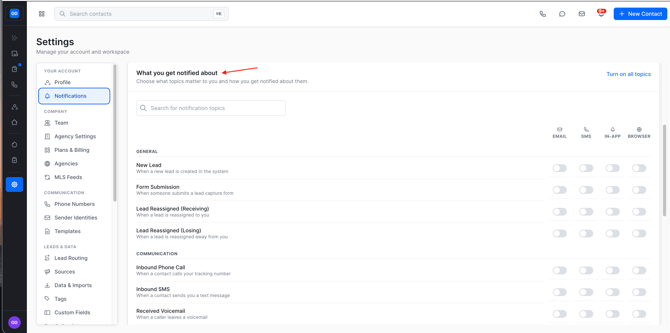
- Select what you get notified about
- Go through each section and decide what notifications you would like and how you would like to be notified.
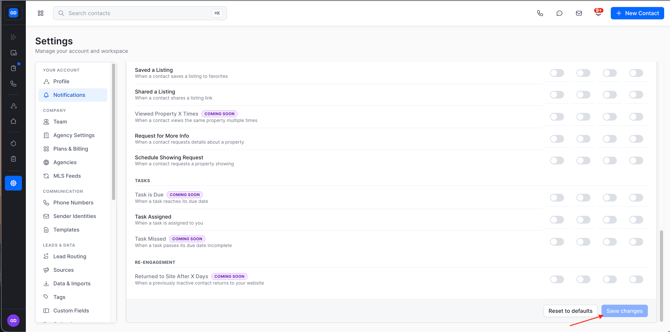
- Save your preferences
- Go through each section and decide what notifications you would like and how you would like to be notified.
Need Help?
- Contact support at support@ggms.com