.png?width=250&height=38&name=GGMS%20Knowledge%20Base%20Logo%20(1).png)
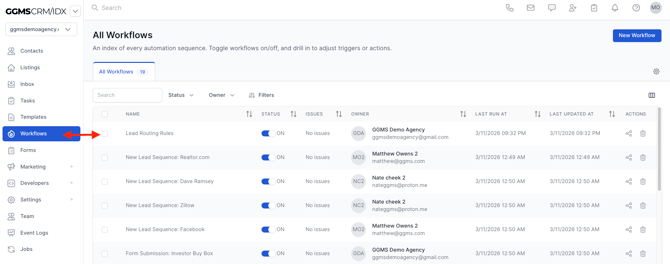
Step 1: Navigate to Workflows
-
From the left-hand menu, click Workflows
-
Locate and select your Lead Routing workflow
Step 2: Open Lead Routing Rules
-
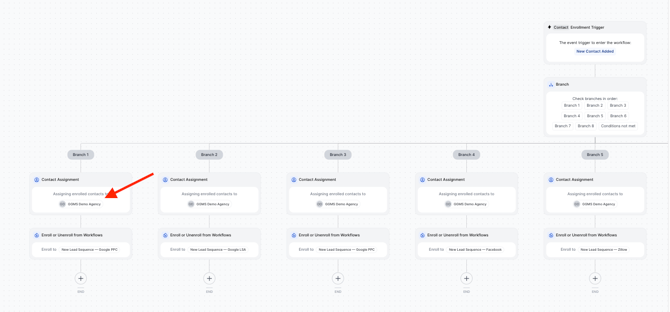
Click into the Lead Routing workflow
-
You will see multiple branches set up by lead source (e.g., Google, PPC, Organic)
Step 3: Configure Contact Assignment
-
Inside each branch, locate the Contact Assignment section
-
Click into the Contact Assignment field
Step 4: Choose Distribution Style
-
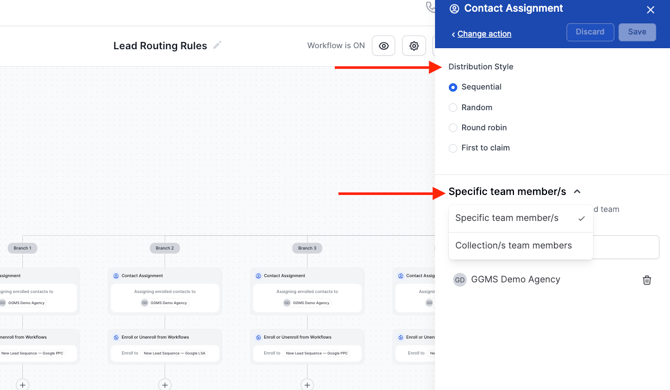
Select how leads should be distributed (e.g., round robin, specific assignment)
-
Choose:
-
Specific Team Members (assign individuals directly), or
-
Collections (assign a predefined group)
-
Step 5: Assign Team Members or Collections
-
If assigning individuals:
-
Select one or more team members
-
-
If using collections:
-
Choose or create a saved Collection from your Team settings
-
Pro Tip: Using Collections saves time by allowing you to assign groups instead of adding each agent individually to every branch.
Additional Notes
-
You can create and manage Collections under the Team section in the left-hand menu
-
Each branch should be configured based on the lead source for accurate routing
Need Help?
If you have any questions or need assistance setting up lead routing, please reach out to support@ggms.com